Understanding Network Types from the Ground Up: PAN, LAN, WLAN, CAN, MAN, WAN, and Beyond
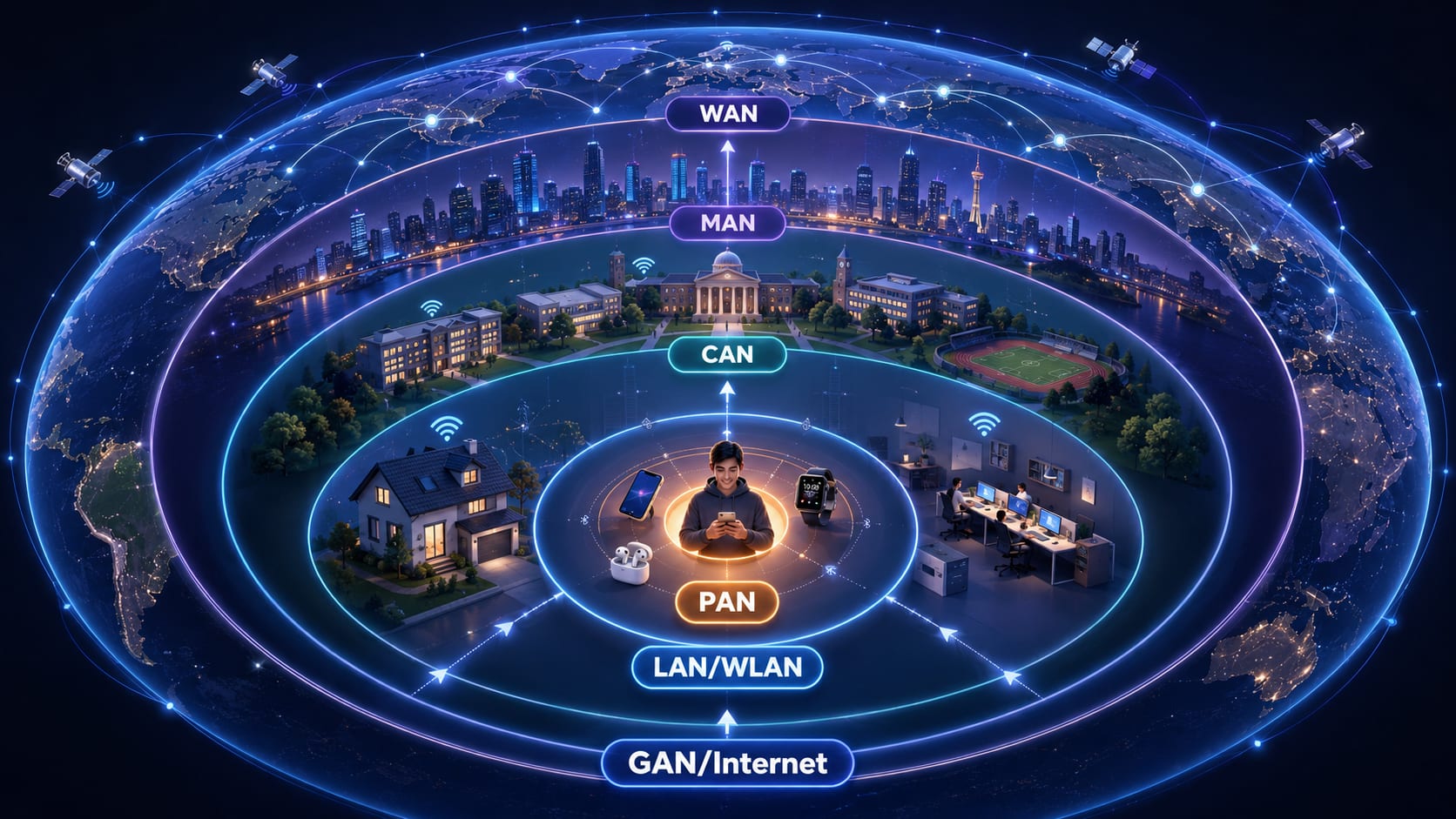
One person watching YouTube on Bluetooth earbuds is quietly using four or five network types at once. This guide builds the full mental model from zero, PAN to GAN, plus VPN, VLAN, SAN, and SDN, and the one rule that ties them all together.
Introduction: One Simple Activity, Many Hidden Networks
A practical, example-first guide to how networks are actually classified, and why it has almost nothing to do with the cable, the Wi-Fi, or the IP address you assumed it did.
Imagine you are sitting at home, lying on your bed, watching YouTube on your phone using your Bluetooth earbuds.
It feels like one simple thing. One phone. One video. One person relaxing.
But under the surface, you are quietly using several different types of networks at the same time, stacked on top of each other like layers of an onion:
Earbuds  →  Phone   →  Wi-Fi Router  →  ISP City Network  →  Global Internet  →  YouTube Server
(PAN) (you) (WLAN/LAN) (MAN-ish) (WAN) (data center)- The link between your earbuds and phone is a tiny personal network called a PAN.
- The link between your phone and your home router over Wi-Fi is part of a LAN, and specifically the wireless slice of it, a WLAN.
- Your router reaching out to your internet provider's city infrastructure touches MAN-scale equipment.
- The journey across the country/world to YouTube's servers rides over a WAN, the Internet itself.
One activity. Four or five network types. Most people never notice.
Why should you care? Because the moment you become a developer, system admin, cybersecurity analyst, cloud engineer, or DevOps person, this invisible structure becomes the thing you debug every single day:
- Your website is "down": is it the LAN, the ISP, DNS, or the server's data center network?
- Your VPN won't connect: is it a VLAN rule, a firewall, or a WAN routing issue?
- Your app is slow only in the office: is it the CAN, a VLAN misconfiguration, or the uplink?
This is the foundational vocabulary of networking. Almost everyone uses the internet, yet very few can say what type of network they're on at any given moment, or why that even matters. But without this vocabulary, everything else in networking is noise you memorize instead of knowledge you actually understand.
You cannot troubleshoot a system you cannot mentally picture. This article gives you that mental picture.
And here is the single most important idea, the one we will repeat until it sticks:
A network type is not decided by the cable or the IP address. It is mainly decided by how wide the network is (scope), what it is designed for (purpose), who owns and designed it (ownership), and how devices are logically connected (logical vs physical structure).
Let's build that understanding from absolute zero.
What Even Is a Network?
Start with the plainest possible version: a network is just two or more devices that can talk to each other and share things.
That's genuinely it. If your phone can send something to your earbuds, that's a network. If your laptop can print to a printer, that's a network. If your browser can fetch a YouTube video from a server in another country, that's a network.
Now tighten the language, because the precise version is the one you'll reach for later. A network is a collection of devices (nodes) connected by some communication medium such as cable, radio waves, fiber, or light, that follow shared rules (protocols) so they can exchange data and share resources: files, printers, internet access, storage, processing. Every word in that sentence was already present in the simple version; we just gave the parts their real names.
In almost every network, devices play one of three roles:
| Role | What it does | Everyday example |
|---|---|---|
| Client | Asks for something | Your browser requesting a web page |
| Server | Provides something | YouTube's machine sending the video |
| Peer | Does both at once | Two laptops sharing files directly |
When you watch that YouTube video, the full conversation looks like this:
Your Phone  →  Home Router  →  ISP  →  Internet  →  YouTube Server
 (client)                                            (server)
     "Give me this video, please"  →  →  →  →  →
     ←  ←  ←  ←  "Here it comes, in pieces"
Everything else in this article is just labels we put on this idea depending on how big it is, what it's for, and how it's designed.
Why Network Types Even Exist
We invented these labels because we needed words to describe networks of different sizes and purposes.
Think about how computers grew up:
1 computer on a desk
   → a few computers in a room
      → all computers in a building
         → all buildings on a campus
            → all campuses across a city
               → all cities across a country
                  → the entire planet
Each jump in size created new problems like distance, cost, ownership, speed, and security, and demanded new solutions. So engineers needed names to say which kind of network they were talking about.
- A network of your personal devices is not the same as your home network.
- Your home network is not the same as your ISP's city network.
- Your ISP's city network is not the same as the global Internet.
They differ in scope, purpose, ownership, and design, so we gave them different names: PAN, LAN, CAN, MAN, WAN, and more.
Crucially, these names are mostly about scope and intent, not about whether you used a cable or Wi-Fi. Keep that in your pocket; we'll keep pulling it out.
The Main Size-Based Network Types
These are the "classic five-plus" you'll see everywhere. They are arranged roughly by how much area they cover:
PAN  <  LAN/WLAN  <  CAN  <  MAN  <  WAN  <  GAN
(you)   (a place)    (campus) (city)  (countries) (planet)
Let's go through each one slowly and deeply.
PAN: Personal Area Network
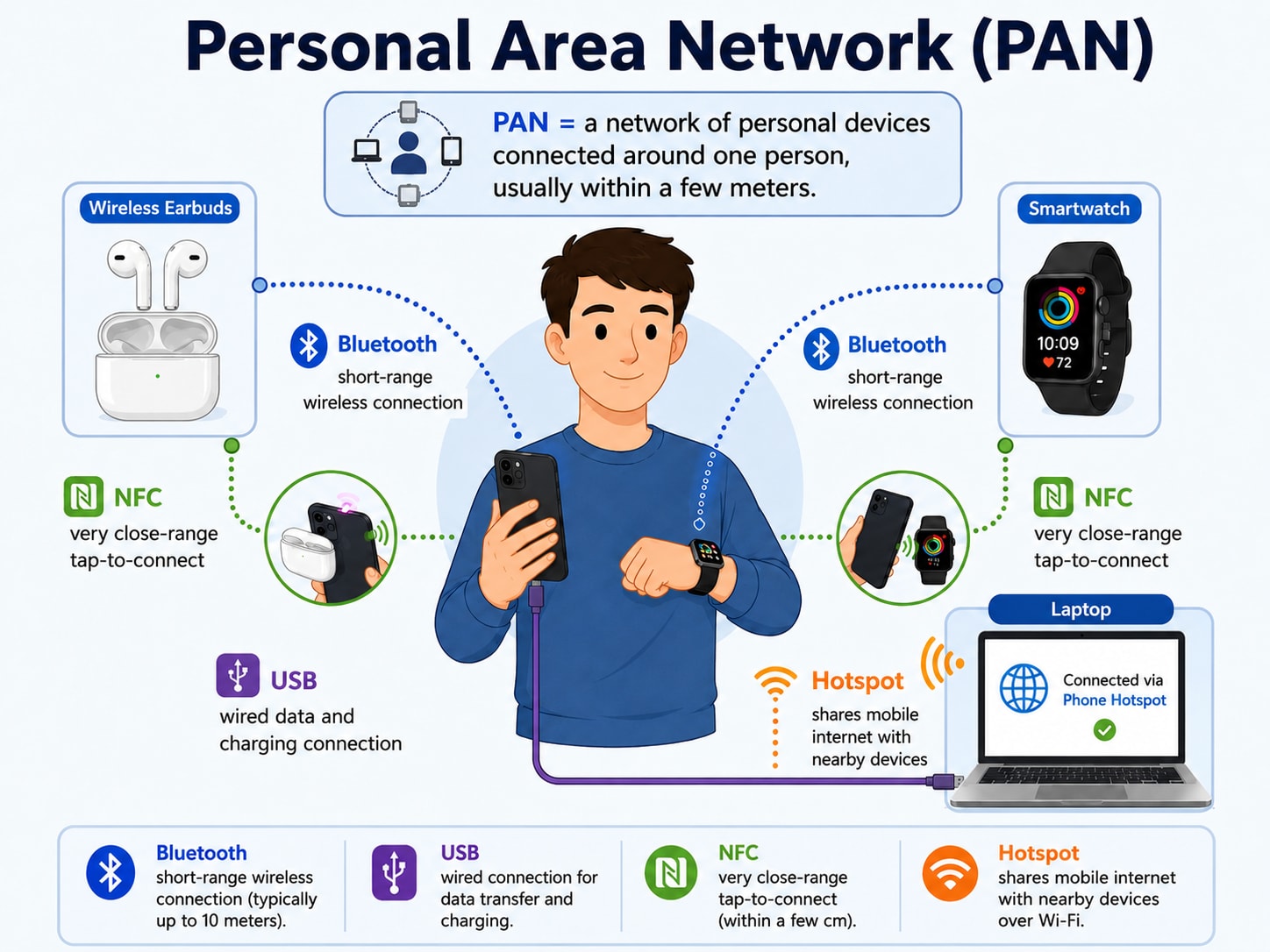
A PAN is the tiny network of gadgets around your own body or immediate personal space. It's "your stuff talking to your stuff," and that intuition is exactly right. Put formally, a Personal Area Network is a very short-range network, typically a few centimeters to about 10 meters, that interconnects devices centered on a single person.
The short range is the whole point, and it shows up in the technologies that build a PAN:
- Bluetooth (earbuds, smartwatch, speaker)
- USB cable (phone ↔ laptop)
- NFC (tap-to-pay, tap-to-share, a few centimeters)
- Wi-Fi Direct (device-to-device without a router)
- Personal hotspot (your phone sharing internet to your laptop)
So in everyday life a PAN looks like:
- Phone ↔ wireless earbuds
- Phone ↔ smartwatch
- Laptop ↔ phone via USB
- Phone hotspot ↔ laptop
            ┌─────────────┐
   Bluetooth│   Earbuds   │
      ┌─────┤             │
      │     └─────────────┘
┌─────┴─────┐        ┌──────────────┐
│   PHONE   │── BT ──│  Smartwatch  │
│  (center) │        └──────────────┘
└─────┬─────┘
      │ USB / Hotspot
      │     ┌──────────────┐
      └─────│    Laptop    │
            └──────────────┘
         (all "around one person" = PAN)
Edge Case: Devices in Different Cities
"If one device is in Dhaka and another is in Barisal, can it still be a PAN?"
Short answer: No, not in the normal sense.
A PAN is defined by being short-range and personal. The moment your two devices are in different cities, the actual signal cannot travel by Bluetooth or USB across ~200 km. To connect them, the traffic must ride over the Internet, a VPN, or some cloud/remote service.
So:
- The relationship may still feel personal ("both are my devices").
- But the network scope is no longer PAN. The transport path is now wide-area, meaning a WAN is involved.
This is your first taste of the golden rule: the relationship between devices does not define the network type; the scope and path of the actual communication does.
Can One Device Be in a PAN and a LAN at Once?
Yes. Your phone can be connected to your earbuds (PAN) and to your home Wi-Fi router (LAN) at the same instant. A single device commonly belongs to multiple networks simultaneously. This is normal, not a contradiction.
LAN: Local Area Network
A LAN is all the devices inside one local place, your whole home or one office floor, that can talk to each other. Said more precisely, a Local Area Network connects devices within a single limited location (a home, an office, a floor, a building) under one administrative ownership, usually with high speed and low latency. That "one ownership, one place, fast" combination is what separates a LAN from everything bigger.
The hardware is familiar: Ethernet cables, Wi-Fi, switches, routers, and access points. Typical examples:
- Home router connecting your phone, laptop, smart TV, and printer
- An office switch connecting 30 PCs and a shared printer
Private IP Addresses
LAN devices usually get private IP addresses, which are special address ranges reserved for internal use and not routable on the public Internet:
| Range | Looks like |
|---|---|
192.168.0.0 – 192.168.255.255 | 192.168.0.5 |
10.0.0.0 – 10.255.255.255 | 10.0.0.12 |
172.16.0.0 – 172.31.255.255 | 172.16.4.9 |
This is why your devices at home are often 192.168.0.x.
Edge Case: Do Matching Private IPs Always Mean LAN?
"If two devices are 192.168.0.5 and 192.168.0.6, does that always mean LAN?"
No. This is one of the most common misunderstandings in all of networking.
A private IP address only tells you the devices are using a private (non-public) addressing scheme and may belong to the same logical network. It tells you nothing about physical distance.
Two devices can have 192.168.0.5 and 192.168.0.6 and be:
- In the same room → genuinely a LAN, or
- In different cities, connected through a VPN or a private WAN/MPLS link that makes them appear to share one private network.
In that second case, they share a logical network, but the physical transport carrying their traffic is a WAN.
Logical Network vs Physical Network
This distinction will save you a hundred times:
- Logical network: how devices are grouped and addressed (e.g., "all
192.168.0.x, same subnet"). - Physical/geographic network: where the devices actually are and what real infrastructure carries the bits.
Same logical network ≠ same physical location. Hold onto this; the Physical vs Logical Networks section is built entirely around it.
        ┌──────────────────────────────── LAN (one home) ─┐
        │                                                  │
  ┌─────┴─────┐                                            │
  │  ROUTER   │──Ethernet──┐                               │
  │ 192.168.0.1            │                               │
  └─────┬─────┘       ┌────┴─────┐   ┌──────────┐          │
        │ Wi-Fi       │ Smart TV │   │ Printer  │          │
   ┌────┴────┐        │ .0.20    │   │ .0.30    │          │
   │  Phone  │        └──────────┘   └──────────┘          │
   │ .0.5    │   ┌──────────┐                              │
   └─────────┘   │  Laptop  │                              │
                 │ .0.6     │                              │
                 └──────────┘                              │
        └──────────────────────────────────────────────────┘
WLAN: Wireless Local Area Network
Here's where many beginners get confused, so let's be very clear:
WLAN is not a different "size" of network from LAN. WLAN is simply the wireless part of a LAN.
Compare this to WAN, which really is a different scope from LAN. WLAN is not like that. WLAN is a more specific kind of LAN, one where local devices connect using Wi-Fi instead of cables.
Watch it inside a single home, with two connection styles but still one LAN:
- Your phone joins by Wi-Fi → that's the WLAN part.
- Your desktop joins by Ethernet cable → that's the wired LAN part.
- Both are part of the same single LAN.
| Term | Meaning |
|---|---|
| LAN | The general local network (wired + wireless together) |
| WLAN | The wireless portion/type of that LAN |
| Wired LAN | The cabled portion of that LAN |
Edge Case: Is the Whole Thing WLAN?
"Router connects to ISP by cable, devices connect to router by Wi-Fi. Is the whole thing WLAN?"
Let's split it precisely:
- Device ↔ router over Wi-Fi → that local wireless link is the WLAN.
- The whole home network (Wi-Fi devices + any cabled devices) → still a single LAN.
- Router ↔ ISP → this is outside your home LAN entirely. It heads toward your ISP's network / WAN.
         ── WLAN (wireless slice) ──
   ┌─────────┐ Wi-Fi  ┌──────────┐
   │  Phone  │~~~~~~~~~│          │  ← cable to ISP →  to WAN
   └─────────┘        │  ROUTER  │====================
   ┌─────────┐ Wi-Fi  │          │
   │ Tablet  │~~~~~~~~~│          │
   └─────────┘        └────┬─────┘
                           │ Ethernet
                      ┌────┴─────┐
                      │ Desktop  │  ← wired LAN slice
                      └──────────┘
   └──────── all of this = ONE LAN ────────┘
CAN: Campus Area Network
A CAN is what you get when you connect several LANs together across one campus, like all the buildings of a university talking to each other. Formally, a Campus Area Network interconnects multiple LANs within a limited geographic area owned by a single organization: a university, hospital, corporate park, or factory. Notice the new ingredient compared to a LAN; it's still one owner, but now it's many buildings stitched together.
That pattern shows up everywhere:
- A university's library, science building, and dorms all networked together
- A hospital campus (wards, labs, admin, pharmacy)
- A school with several blocks
- A corporate office park
- A large factory site
Where it sits:
LAN   <   CAN   <   MAN
(one building)  (one campus)  (whole city)
To bridge those buildings you need more reach than a single room's switch: a fiber-optic backbone between buildings, plus Ethernet, switches, routers, and Wi-Fi inside each building.
The clean way to think about it: a CAN is like a small, private MAN, but limited to one campus or one organization's area, rather than spanning a whole public city.
┌──────────────── CAN (University Campus) ────────────────┐
│                                                         │
│  ┌── LAN ──┐   fiber   ┌── LAN ──┐   fiber  ┌── LAN ──┐ │
│  │ Library │===========│ Science │==========│ Dorms   │ │
│  │ block   │           │ block   │          │ block   │ │
│  └─────────┘           └─────────┘          └─────────┘ │
│       each block has its own switches + Wi-Fi           │
└─────────────────────────────────────────────────────────┘
MAN: Metropolitan Area Network
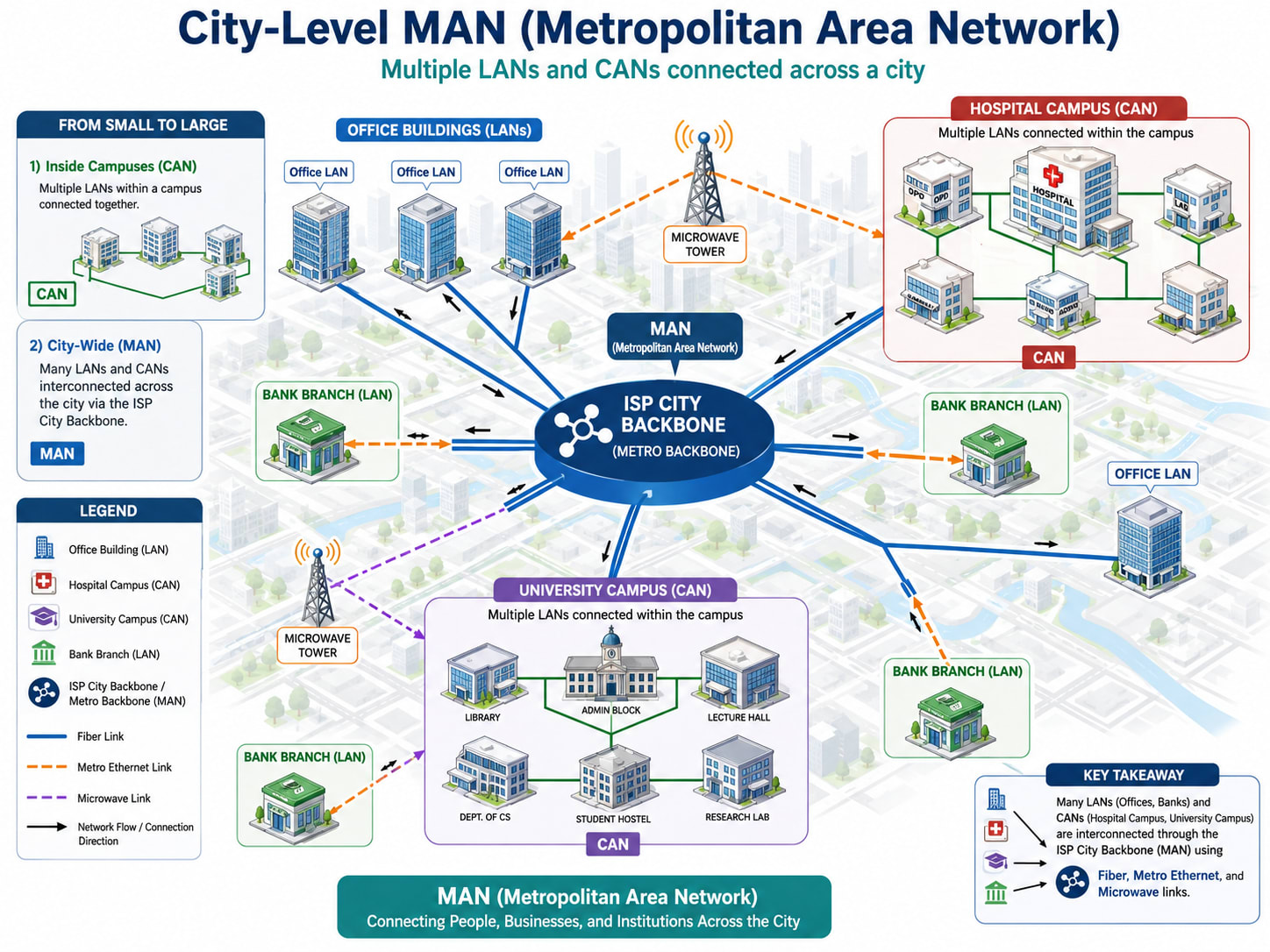
A MAN is a network spread across a whole city, connecting many LANs and CANs that sit in different parts of the metropolitan area. Precisely, a Metropolitan Area Network interconnects multiple LANs/CANs across a city or metropolitan region, often built or provided by an ISP or large organization. The jump from CAN to MAN is the jump from one campus you own to a whole city you typically share.
That scale fits cases like:
- All branches of a bank across Dhaka, linked together
- A hospital group's locations across a city
- A university's separate campuses in different parts of the city
- An ISP's city-wide network
- A cable TV provider's distribution network, or a city-wide public Wi-Fi deployment
The key idea mirrors the one before it: just as multiple LANs make a CAN, multiple CANs (and LANs) across a city can become part of a MAN.
Spanning a city means new transport technologies; here is each one in plain terms:
| Technology | What it means |
|---|---|
| Metro Ethernet | Ethernet service stretched across an entire city, so distant offices feel "local" |
| Fiber-optic cable | Cables that carry data as pulses of light, making it extremely fast over long distances |
| Microwave link | A wireless, point-to-point connection between two antennas/towers, used to bridge distances without laying cable |
| ISP city backbone | The ISP's main high-speed network spine that ties the whole city together |
┌──────────────────── MAN (One City: Dhaka) ────────────────────┐
│                                                               │
│  ┌─CAN─┐        ┌─LAN─┐         ┌─CAN─┐        ┌─LAN─┐         │
│  │Univ │        │Bank │         │Hosp.│        │Bank │         │
│  │campus│       │br. 1│         │campus│       │br. 2│        │
│  └──┬──┘        └──┬──┘         └──┬──┘        └──┬──┘         │
│     │  fiber       │  metro-E      │  fiber       │ microwave  │
│     └──────────────┴───────────────┴──────────────┘           │
│                  ISP CITY BACKBONE                            │
└───────────────────────────────────────────────────────────────┘
WAN: Wide Area Network
A WAN is a network that stretches across cities, countries, or continents, and the biggest WAN of all is the Internet. In technical terms, a Wide Area Network connects geographically distant networks, often interconnecting LANs, CANs, and MANs over long distances using carrier infrastructure. This is the level where you stop owning the wire yourself and start renting reach from telecom carriers.
You meet WANs whenever distance gets serious:
- A company's Dhaka office connected to its Chittagong office
- A Bangladesh head office connected to a branch in Germany
- The Internet itself
The key idea: a WAN can connect LANs, CANs, and MANs together over distance. The technologies that make that possible:
- ISP backbone (the provider's long-haul core)
- Leased line (a dedicated private circuit you rent)
- MPLS (a carrier technique for fast, managed private WAN routing)
- Satellite (for remote/global reach)
- Submarine cable (undersea fiber linking countries/continents)
- Long-distance fiber
- VPN over the Internet (a private tunnel riding the public WAN)
Edge Case: A Cable Between Two City Offices
"My router connects by cable to another office's router in another city. What is that?"
It's a WAN. The deciding factor is not that you used a cable; it's that the connection crosses cities. Distance and scope win over medium, every time.
Important Clarification
WAN does not mean only "submarine cables" or "the national core." Any network spanning a large distance, even a single cable link between two cities, is operating at WAN scope.
   Dhaka Office LAN          Chittagong Office LAN
   ┌──────────┐                 ┌──────────┐
   │  Router  │                 │  Router  │
   └────┬─────┘                 └────┬─────┘
        │     leased line / MPLS /   │
        └────── VPN over Internet ───┘
              ←──── WAN (crosses cities) ────→
GAN: Global Area Network
At the very top of the size ladder is the GAN, a network at global, planet-wide scale. A Global Area Network spans worldwide, often combining satellite systems, global mobile networks, and a corporation's international links into one managed whole. In everyday practice the term is used less often than WAN.
You'd reach for it to describe:
- A multinational's worldwide enterprise network tying together offices on multiple continents
- Global satellite or mobile networks that follow you across countries
You can reasonably think of the Internet as a global-scale WAN, which is part of why "GAN" is used sparingly; "WAN/Internet" already covers most of what people mean.
Special-Purpose and Design-Based Network Types
Everything above was sorted by size. The next group is different: these are sorted by purpose and design, not distance. You can build any of them at small or large scope, which is exactly why they don't fit on the PAN→GAN ladder.
VPN: Virtual Private Network
A VPN is a private, encrypted tunnel that runs through another network (usually the Internet), so it feels like you're safely "inside" a network you're physically far from. More formally, a Virtual Private Network creates an encrypted, authenticated tunnel over an underlying (often public) network, extending private network access across untrusted infrastructure.
It comes in two main flavors:
Remote-access VPN:
Home Laptop ──encrypted tunnel over Internet──▶ Office NetworkYou're at home, but you can reach office file servers as if you were at your desk.
Site-to-site VPN:
Office A LAN ──encrypted tunnel──▶ Office B LANTwo whole offices joined securely over the public Internet.
The crucial point: a VPN runs over a WAN/the Internet. It does not replace the LAN/WAN size classification. VPN describes how private and secure the access is, not how big the network is. A VPN connection between two cities is still, physically, traveling over a WAN.
VLAN: Virtual Local Area Network
A VLAN lets you split one physical network into several separate logical networks, even if everything is plugged into the same switch. Technically, a Virtual LAN logically segments a single physical LAN into isolated broadcast domains, so devices are grouped by policy rather than by physical wiring.
Picture one office switch carrying four isolated networks at once:
- Admin VLAN (management)
- Staff VLAN (employees)
- Guest VLAN (visitors' Wi-Fi)
- CCTV VLAN (cameras)
Why bother splitting like this?
- Security (guests can't reach admin systems or cameras)
- Organization (clean separation by department/function)
- Traffic control (limit broadcast storms, prioritize traffic)
Two devices can be plugged into the same physical switch yet sit in different VLANs and be unable to talk to each other directly, because they're on different logical networks.
                ┌────────── ONE PHYSICAL SWITCH ──────────┐
   Admin PC ────┤ VLAN 10 (Admin)                         │
   Staff PC ────┤ VLAN 20 (Staff)                         │
   Guest AP ────┤ VLAN 30 (Guest)                         │
   Camera   ────┤ VLAN 40 (CCTV)                          │
                └─────────────────────────────────────────┘
     Same cable closet, same switch. Logically separated.
SAN: Storage Area Network
A SAN is a high-speed network built just for storage, connecting servers to big pools of disks so the storage behaves like it's directly attached. In precise terms, a Storage Area Network provides block-level access to consolidated storage over a dedicated high-speed network, presenting remote storage to servers as if it were a local drive. You'll find them in data centers, cloud hosting platforms, enterprise databases, and large backup systems.
The cleanest way to understand a SAN is to contrast it with the file sharing you already know:
- Normal file sharing (e.g., a shared folder) gives you files over your regular LAN.
- A SAN gives servers raw block storage (like a virtual hard disk) over a separate, dedicated, very fast network.
To move storage traffic that efficiently, SANs use specialized protocols: iSCSI, Fibre Channel (FC), and FCoE.
SDN: Software-Defined Networking
For decades, a network's "brain" lived inside each individual device: every switch and router decided on its own where to send traffic, and changing the network meant logging into boxes one by one and editing their configs by hand. Software-Defined Networking (SDN) breaks that model apart. It separates the control plane (the decisions about where traffic should go) from the data plane (the hardware that actually forwards the packets), and lifts all the decision-making up into a central software controller.
In plain terms: instead of programming fifty switches individually, you tell one controller what you want, and it programs the whole network for you, often through open interfaces like OpenFlow and through APIs that let other software change the network automatically.
Why this matters, especially in the cloud era:
- Programmability: the network becomes code. You can create, change, or tear down network paths with an API call instead of a screwdriver and a console cable.
- Centralized view: one controller sees the whole topology, so it can route traffic intelligently and react to congestion or failure almost instantly.
- Automation at scale: this is what lets a cloud provider build thousands of isolated virtual networks for thousands of customers on the same physical hardware.
You've actually met SDN's relatives already without naming them: a VLAN is logical separation defined by configuration, and a cloud VPC (virtual private cloud) is essentially a software-defined network you rent by the hour. SDN is the broader principle that a network's behavior is defined in software, not frozen into hardware, which is exactly why it's quietly reshaping data centers, carriers, and cloud platforms today.
Access-Based Networks: Internet, Intranet, Extranet
These three are classified by who is allowed to access them.
- Internet is the public, global network anyone can join. It is the network of networks.
- Intranet is a private, internal network for one organization's members only (e.g., a company's internal HR portal, wiki, and tools).
- Extranet is a private network extended to selected outsiders, specifically clients, partners, or suppliers, but still not open to the general public (e.g., a supplier portal where vendors log in to manage orders).
| Type | Who can access | Example |
|---|---|---|
| Internet | Everyone, globally | Google, YouTube, public websites |
| Intranet | Only internal staff | Company HR portal, internal wiki |
| Extranet | Staff + selected outside partners | Supplier/vendor order portal, client dashboard |
Think of it as concentric rings of trust:
   ┌─────────── INTERNET (everyone) ───────────┐
   │   ┌──────── EXTRANET (chosen partners) ─┐  │
   │   │   ┌──── INTRANET (staff only) ───┐  │  │
   │   │   │        internal tools        │  │  │
   │   │   └──────────────────────────────┘  │  │
   │   └─────────────────────────────────────┘  │
   └────────────────────────────────────────────┘
Architecture-Based Networks: Client-Server vs Peer-to-Peer
These are classified by how devices relate to each other, meaning who serves whom.
Client-Server Network
Some machines (clients) ask, and dedicated machines (servers) answer. Roles are fixed: a client stays a client, a server stays a server. You live inside this model constantly, visiting a website, using Gmail, watching YouTube, running on WordPress hosting. Your browser is the client; the web server serves the pages.
 Client ──request──▶ ┌────────┐
 Client ──request──▶ │ SERVER │ ──responds to all──▶
 Client ──request──▶ └────────┘
Peer-to-Peer (P2P) Network
Now flip that fixed arrangement: in peer-to-peer, every device is both a client and a server, sharing directly with each other, with no central boss. You see it in local file sharing between two laptops, in BitTorrent, in blockchain networks, and in some multiplayer game models.
   Peer ◀────▶ Peer
     ▲   ╲    ╱   ▲
     │    ╲  ╱    │
     ▼     ╲╱     ▼
   Peer ◀────▶ Peer
(everyone gives and takes)| Feature | Client-Server | Peer-to-Peer |
|---|---|---|
| Roles | Fixed (client or server) | Mixed (every peer is both) |
| Central authority | Yes (the server) | No (decentralized) |
| Scalability | Server can be a bottleneck | Scales as peers join |
| Single point of failure | Server down = service down | No single point |
| Examples | Websites, Gmail, YouTube | BitTorrent, blockchain, local sharing |
The Most Important Mental Model: Physical vs Logical Networks
If you remember only one section, make it this one. Almost every confusing networking question dissolves once you separate physical from logical.
- Physical network: where devices really are and what real cables/links/radio carry the data.
- Logical network: how devices are grouped, addressed, and how they perceive their connections.
These two can disagree, and that's where beginners get tricked:
- Same IP range ≠ same physical LAN. Two
192.168.0.xdevices can be in different cities. - Different cities can share private IPs through VPN/MPLS/private WAN, forming one logical private network over a physical WAN.
- A VPN user is logically "inside the office" while physically sitting at home in another district.
- A VLAN logically separates devices that are physically on the same switch.
- A PAN cannot stay a PAN if the real communication travels through long-distance Internet infrastructure; the personal relationship survives, but the network scope does not.
The Defining Example
Device A: 192.168.0.5   (physically in Dhaka)
Device B: 192.168.0.6   (physically in Barisal)
If these two communicate over a VPN or a private ISP/MPLS link, then:
- Logically: they appear to be in the same private network/subnet, with the same address style; they "see" each other as local.
- Physically: their traffic crosses ~200 km of carrier infrastructure. The transport path is a WAN.
So is it "a LAN" because of the IPs, or "a WAN" because of the distance? It's both, at different layers. Logical view: one private network. Physical view: WAN transport. A strong engineer holds both pictures at once and never confuses one for the other.
Is Network Type About Cable, IP, or Distance?
Let's make this concrete with a quick argument between four voices.
Beginner "Okay, simple. If I use a cable, it's a LAN, right?"
Engineer "Not necessarily. A cable can run three meters across your room (LAN), or it can be a leased line carrying traffic from Dhaka to Chittagong (WAN). The cable doesn't decide; the distance and scope do."
Skeptic "Fine, then it's the IP address. 192.168.x.x means LAN. Always."
Engineer "Also no. A private IP just means private addressing. Two 192.168.0.x machines can sit in different cities, joined by a VPN. Same logical network, but the bits travel over a WAN."
Beginner "Then what about Bluetooth? Bluetooth is personal, so if Bluetooth somehow links two cities, it's a PAN?"
Engineer "Bluetooth can't span two cities on its own; it's short-range. If two cities are connected, something else (the Internet, a VPN) is doing the real carrying. That path is WAN. The relationship is personal; the scope is not PAN."
Skeptic "Alright, smart guy. My router connects to another router in the same city. That's a MAN, yes?"
Engineer "Now you're thinking in scope. Good. Two routers across a city, linked through city-scale infrastructure, is operating at MAN scale. And if you connect multiple CANs across that city, yes, together they form part of a MAN."
Beginner "So the cable, the IP, the device... none of them are the real answer?"
Final answer: The medium (cable/Wi-Fi/fiber/Bluetooth) and the addressing (public/private IP) are clues, not the verdict. Network classification depends on scope (how wide), purpose (what it's for), and design (how it's logically built), not only the cable, the IP, or the device.
The Full Real-Life Flow: One YouTube Video, Every Network Type
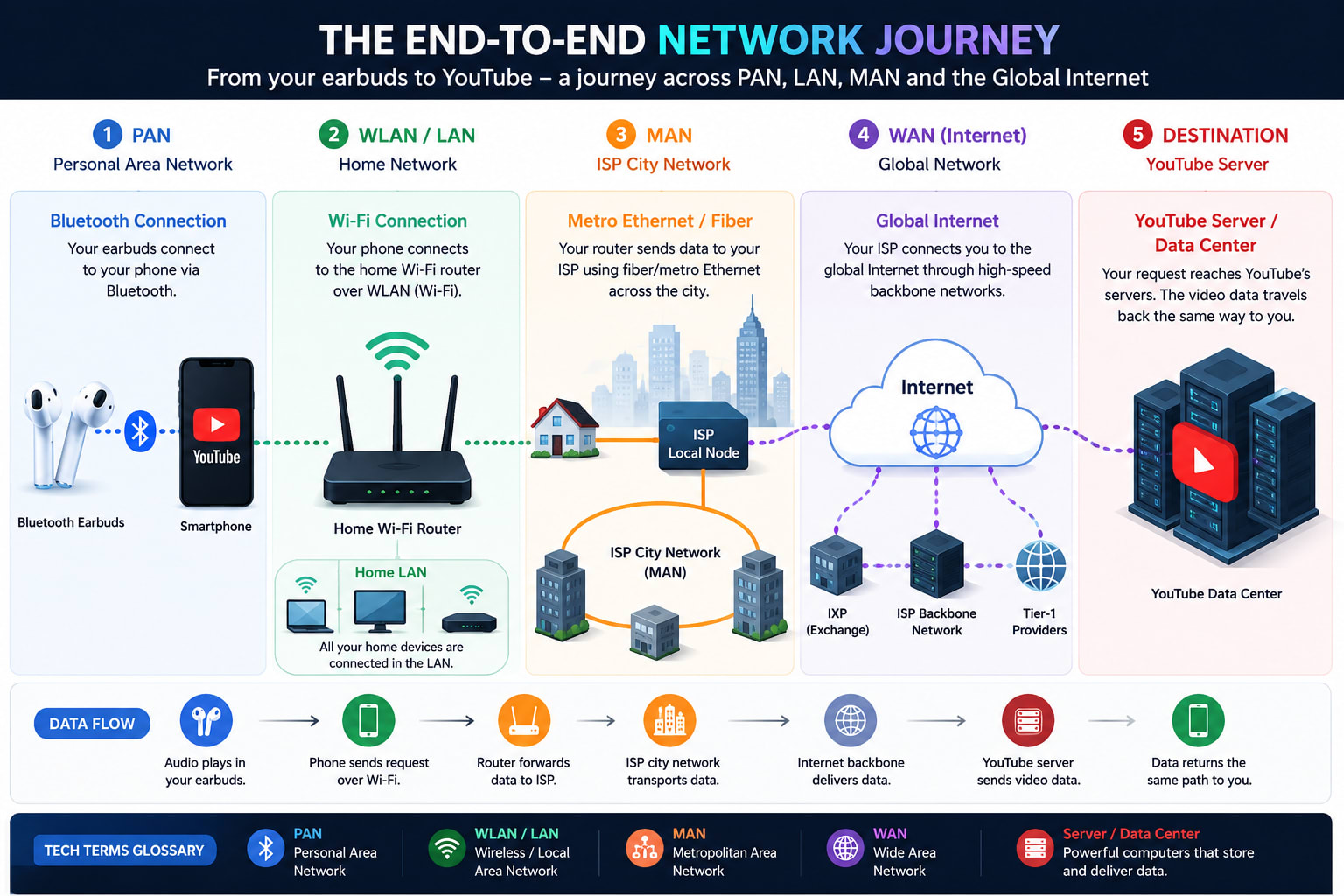
Let's return to where we started and label every single hop.
"I am watching YouTube on my phone using Bluetooth earbuds at home."
| Step | Connection | Network type |
|---|---|---|
| 1 | Earbuds ↔ Phone (Bluetooth) | PAN |
| 2 | Phone ↔ Home Router (Wi-Fi) | WLAN, inside your LAN |
| 3 | Router ↔ ISP city network | ISP access; MAN-scale infrastructure |
| 4 | ISP ↔ YouTube server (across the Internet) | WAN |
| 5 | YouTube data center | part of a global network (GAN-scale) |
┌──────┐  BT   ┌───────┐  Wi-Fi  ┌────────┐  fiber  ┌──────────┐  Internet  ┌──────────────┐
│Earbuds│~~~~~~│ Phone │~~~~~~~~~│ Router │========│ ISP City │===========│   YouTube    │
└──────┘       └───────┘         └────────┘         │ Network  │           │ Server / DC  │
                                                    └──────────┘           └──────────────┘
  PAN            (you)             WLAN/LAN            MAN-ish                WAN → global

  └─ PAN ─┘└──────── LAN ────────┘└──── MAN scale ────┘└───── WAN / Internet ─────┘└─ GAN ─┘
One relaxed evening. Five network types, layered seamlessly. Now you can see them.
The Big Comparison Table
| Type | Full form | Coverage | Example | Main technology | Classification |
|---|---|---|---|---|---|
| PAN | Personal Area Network | Around one person (~1–10 m) | Phone ↔ earbuds | Bluetooth, USB, NFC, Wi-Fi Direct | Size |
| LAN | Local Area Network | One local place (home/office) | Home Wi-Fi devices | Ethernet, Wi-Fi, switches | Size |
| WLAN | Wireless LAN | Wireless part of a LAN | Phone on home Wi-Fi | Wi-Fi (access points) | Size (a specific LAN) |
| CAN | Campus Area Network | One campus/organization area | University buildings | Fiber, Ethernet, switches | Size |
| MAN | Metropolitan Area Network | A whole city | Bank branches across Dhaka | Metro Ethernet, fiber, microwave | Size |
| WAN | Wide Area Network | Cities/countries/continents | Dhaka ↔ Germany office; Internet | ISP backbone, MPLS, leased line, submarine cable | Size |
| GAN | Global Area Network | Worldwide | Global enterprise/satellite net | Satellite, global mobile, intl. links | Size |
| VPN | Virtual Private Network | Any (rides over WAN/Internet) | Home laptop → office | Encrypted tunnels (IPsec, etc.) | Purpose/Design |
| VLAN | Virtual LAN | Logical, within a LAN | Admin/Staff/Guest/CCTV split | Switch tagging (802.1Q) | Purpose/Design |
| SAN | Storage Area Network | Data center / enterprise | Server ↔ storage pool | Fibre Channel, iSCSI, FCoE | Purpose/Design |
| SDN | Software-Defined Networking | Any (controls other networks) | Cloud VPCs, automated data centers | Central controller, OpenFlow, APIs | Purpose/Design |
| Internet | n/a | Public, global | Public websites | Global routed IP | Access-based |
| Intranet | n/a | Private, internal | Company HR portal | Internal IP services | Access-based |
| Extranet | n/a | Private + select outsiders | Supplier/partner portal | Controlled external access | Access-based |
| Client-Server | n/a | Any scope | Website, Gmail | Servers + clients | Architecture-based |
| Peer-to-Peer | n/a | Any scope | BitTorrent, blockchain | Decentralized peers | Architecture-based |
How to Identify a Network Type Quickly
Run through these top to bottom:
- Devices around one person? → PAN
- Devices inside one local place? → LAN
- That local network, but wireless? → WLAN
- Multiple LANs inside one campus/organization? → CAN
- Spanning across a city? → MAN
- Spanning across cities/countries? → WAN
- Worldwide scale? → GAN / global WAN
- A secure encrypted tunnel over another network? → VPN
- Logical separation inside a LAN (same switch, different groups)? → VLAN
- A storage-focused, high-speed network? → SAN
- A network controlled centrally by software, not box-by-box? → SDN
- Public, global access? → Internet
- Private, internal-only access? → Intranet
- Private access for selected outsiders? → Extranet
Common Mistakes and the Fixes
Mistake 1: "Wi-Fi means WAN."
No. Wi-Fi is just a wireless medium. Home Wi-Fi is WLAN/LAN. The medium isn't the scope.
Mistake 2: "Private IP (192.168.x.x) always means LAN."
No. Private IPs can exist across cities via VPN/MPLS. Logical grouping ≠ physical location.
Mistake 3: "A router always means LAN."
No. Routers exist at every scale: home routers, ISP routers, and core WAN routers. A router connecting two cities is doing WAN work.
Mistake 4: "A cable always means LAN."
No. A leased line is a cable too, and it can carry WAN traffic between cities.
Mistake 5: "VPN is its own distance-based network type."
No. VPN is purpose/design-based (privacy + security). It rides over a WAN/Internet; it doesn't replace size classification.
Mistake 6: "WLAN and LAN are totally separate things."
No. WLAN is the wireless part of a LAN. Unlike WAN, it's not a different scope.
Mistake 7: "MAN means only ISP."
No. ISPs often build MANs, but a bank or university connecting its city locations is also a MAN. It's about city-wide scope, not just ISPs.
Mistake 8: "A device belongs to only one network."
No. Your phone can be in a PAN (earbuds) and a LAN (Wi-Fi) at the same time. Multiple memberships are normal.
The Final Mental Model
Lock these one-liners into memory:
| Type | One-line meaning |
|---|---|
| PAN | My personal devices |
| LAN | Devices in one local place |
| WLAN | The wireless part of a LAN |
| CAN | LANs inside one campus |
| MAN | LANs/CANs across a city |
| WAN | Networks across cities/countries |
| GAN | A global-scale network |
| VPN | A secure tunnel over another network |
| VLAN | Logical separation inside a LAN |
| SAN | A dedicated storage network |
| SDN | A network run by central software, not box-by-box |
And the rule that ties it all together: Classify by scope, purpose, and design, not by the cable, the IP, or the device.
Why This Matters the Moment You Build Something
Knowing the names is step one. The reason engineers actually carry this model around in their heads is that the type of network your traffic is on silently sets the rules for everything you build on top of it. Four things flip depending on scope, and getting them wrong is how systems end up slow, expensive, or insecure.
- Latency. Distance is physics. Inside a LAN, a round trip is well under a millisecond; across a WAN to another continent it can be 100–300 ms. If your app chats back and forth many times per request, that gap is the difference between "instant" and "painful." Designing as if you're on a LAN and then deploying across a WAN is one of the most common performance mistakes there is.
- Bandwidth and cost. A LAN gives you gigabits essentially for free. WAN links such as leased lines, cloud egress, and submarine paths are slower and metered. That's why "just send the whole dataset over" is fine inside a data center and a budget disaster between regions.
- Security posture. Every boundary is a trust boundary. Traffic inside your LAN or VLAN is relatively trusted; the moment it crosses onto a WAN or the public Internet, it needs encryption (a VPN, TLS), authentication, and firewalls. Knowing which boundary a packet crosses tells you which defenses it needs.
- Architecture: cloud vs on-prem. When you weigh "cloud vs on-premises," or design VPCs, subnets, and private links, you are literally choosing network types: a private LAN/VLAN-style segment here, a VPN or WAN link there, a public Internet edge out front. The cloud didn't replace these concepts; it turned them into things you provision with code (see SDN above).
So when something is slow, broken, or unsafe, the experienced engineer's first instinct is to ask: what kind of network is this traffic actually crossing, and what does that scope cost me in speed, money, and risk? Asked early, that one question prevents most networking disasters before they happen.
Conclusion: Why This Actually Makes You Better
When you started this article, "PAN, LAN, WAN" might have been just letters to memorize for an exam. Now you can look at one ordinary evening, a phone, some earbuds, a YouTube video, and see the layered architecture of the entire connected world inside it.
That shift in thinking pays off everywhere you go next:
- Web development: you understand where your app lives (LAN? cloud WAN?) and how requests travel.
- Hosting & DNS: you know the difference between a local service and a globally-reachable one.
- APIs: you reason clearly about which network boundaries a call crosses.
- Cloud: VPCs, subnets, and private links suddenly map onto LAN/VLAN/VPN concepts you already own.
- Cybersecurity: you think in trust zones: intranet vs extranet, VLAN isolation, VPN tunnels.
- DevOps: you design and debug connectivity between environments with confidence.
- Troubleshooting: when something breaks, you can pinpoint which layer failed instead of guessing.
- System design: you architect across scopes deliberately, not by accident.
Networking stops being a wall of acronyms and becomes a way of seeing. And that way of seeing, the lens of scope, purpose, design, and logical vs physical thinking, is exactly the kind of clear, structured thinking that separates someone who uses technology from someone who truly understands it.
Keep that lens. Every system you build from here on will be easier to reason about because of it.

Md. Rakib Hassan
Software Engineer